Event Submission & Calendar
How to submit your event, get on the HTW calendar, and manage your event listing and registrations.
Submit Your Event
The HTW 2026 Event Host submission deadline passed on July 31, 2026, and public submissions are closed. Get updates about future editions. The process below remains available as a reference.
If we've already arranged a late submission with you, fill out the event submission form. Late additions are considered case by case, incur a $150 late fee, and are subject to review. We expect some details to change, but do your best to provide the most information on your event, company, and details. Event details and changes can be updated and provided to HTW after submission.
What Happens After You Submit
- Review — Our team will review your submission within 1-3 business days and reach out via email with any questions and the review status.
- Approval — If you have not already created a Luma event or added the event to the Hawaii Tech Week Luma calendar, please complete the Calendar Placement below.
- Calendar — When all steps are done, the event will appear on both the web calendar and Luma calendar.
For reference, see the Event Submission Rubric in the Event Host FAQ & Guide for what we look for when reviewing submissions.
Calendar Placement
HTW currently uses Luma as the calendar registration tool while having a calendar listing on the website for accessibility. Luma is free for event hosts to use and setup. Please do the following:
- Create your event listing on Luma.com. Using your event planning sheet or document, fill in all the relevant event details e.g. title, description, date, time, venue, capacity, cover image, registration settings, etc.
- Set the tickets start date to July 6th. To maximize reach and awareness, HTW coordinates a specific launch date each year. On the Registration tab, set the ticket sales start date to July 6th, 2026 at 12:00 AM.
- Submit your event to the Hawaii Tech Week calendar. On luma.com/hitechweek, click Add Event and select your event (or create one there). Our team will approve the event and it will then appear on the HTW calendar.
Important notes:
- For help creating or managing your Luma event, use the Luma Help Center.
- Final calendar placement is contingent on your event being submitted and approved on the Hawaii Tech Week Luma calendar following these steps.
- Attendee sign-ups on the HTW calendar will receive the annual recap video and future announcements. We don't sell emails and they can unsub anytime.
Registration & RSVP Management
Luma automatically sends a confirmation email when someone registers, including a calendar add. You can customize this email in your Luma settings. Note: every time you update your event, Luma notifies all registrants — so minimize changes once registration is open.
Communicating RSVP Status to Guests
-
Communicate that spots are limited and ask registrants to cancel ASAP if they can no longer attend — this reduces no-shows.
-
If your event requires approval, manage RSVP statuses promptly via Luma:
- Approve guests as soon as possible.
- Reject guests quickly so they can sign up for other events. Be sensitive in your messaging.
- Update waitlisted guests periodically so they know their status.
-
Send 1-2 update emails via Luma to confirmed registrants with announcements and reminders. Keep it valuable — don't over-email.
Event Reminders
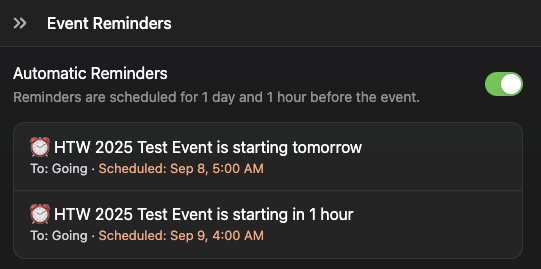
Luma automatically includes 2 reminder emails upon creation of your event, e.g., "Event Name Starts in X time". These are set to one day (24-hours) and one hour prior to the event, and we generally recommend using them. When our team reviews your event on Luma, we'll take a second look to ensure these are configured. Depending on your preference, you can customize these emails later to include special details, event location, photos, and more.
Event Survey & Feedback
Luma automatically sends a post-event feedback survey to attendees. This survey is required for HTW calendar events — it helps us measure overall event quality across the week. For post-event recap and follow-up communications, see the Event Marketing Templates.
- Let attendees know during your event that they'll receive a feedback survey — encourage honest responses.
- Don't juice the results. Constructive feedback makes everyone better.
Check-In
We recommend having your team download the Luma app on their phone and using the check-in functionality / QR for your event. This typically requires 1-2 people max.
Event Changes & Cancellations
If you need to change your event name, date, time, or other major details after submission, contact us as soon as possible.
If the event is on the Luma calendar, updates should be made there. We recommend batching these changes as Luma sends an email to everyone registered each time an update is made.
If you need to cancel your event, notify us immediately. You can then cancel the event in Luma — this automatically notifies all registrants. Please don't leave registrants in the dark.
Find the Right Guidance
- Event fit and host responsibilities: Event Host FAQ & Guide.
- Developing your event idea: Event Planning Template.
- Calendar setup: Follow Calendar Placement above; use the Luma Help Center for Luma settings and troubleshooting.
- Promotion and attendee communications: Event Marketing Templates.
For an issue with an already-submitted event that these resources don't resolve, use the contact form. Include your event name, listing link, the specific issue, and what you've already tried so the team has the information needed to help.